

|
Be the first user to complete this post
|
Add to List |
Message Boxes in VBA Excel (Msgbox)
In VBA Excel Macro, Message Box (Msgbox) is one of the important features. Right from warning messages to calculated values in your code or anything. Whenever the code has something to communicate to the user, it can be done through Message box.
- Open a new Excel WorkBook and press “Alt+F11” to open the Visual Basic Editor
- Copy Paste the following code
Sub FnPainText
    Msgbox “Just A Plain Text”
End Sub
- Run the Macro
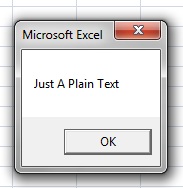
Print Calculated Values in Message Box:
- Open a new Excel WorkBook and press “Alt+F11” to open the Visual Basic Editor
- Copy Paste the following code
Sub FnSomeValues

    Dim mainworkBook as WorkBook
    Set mainWorkBook  = ActiveWorkBook
    intA = mainWorkBook.Sheets(1).Range(“A1”).Value
    intB = mainWorkBook.Sheets(1).Range(“A2”).Value
    intC = Cint(intA) + Cint(intB)
    MsgBox “The Addition of   “ & intA & “  and  “ & intB & “ is “ & intResult
 End Sub
- Run the Macro (Suppose you have put '11' and '13' in 'A1' and 'A2' cells respectively.)
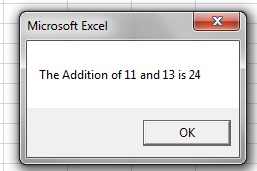
Click here to read about 'Input Boxes in Excel Macro'
Also Read:
- Excel-VBA : Change Passwords for all the WorkSheets in one shot
- VBA-Excel: Copy/Paste data - Copy the Entire data from one sheet to another
- VBA-Excel: Open a Excel WorkBook
- Excel-VBA : Prevent Adding New Worksheet
- VBA-Excel: Modified Consolidator – Merge or Combine Multiple Excel Files Into One Where Columns Are Not In Order